📋 System Overview
This is an automated travel journal built on AWS serverless infrastructure with OpenAI integration for intelligent audio transcription validation. The system processes photos, audio recordings, and text notes uploaded to S3, automatically generating timestamped blog posts served via CloudFront.
- Audio Processing: Amazon Transcribe converts voice recordings to text, OpenAI validates and cleans transcriptions
- Image Processing: Amazon Rekognition detects wildlife, objects, and scenes in photos
- Content Assembly: Hourly batch job aggregates pending uploads into unified blog posts with metadata stored in DynamoDB
🏗️ Architecture Diagram
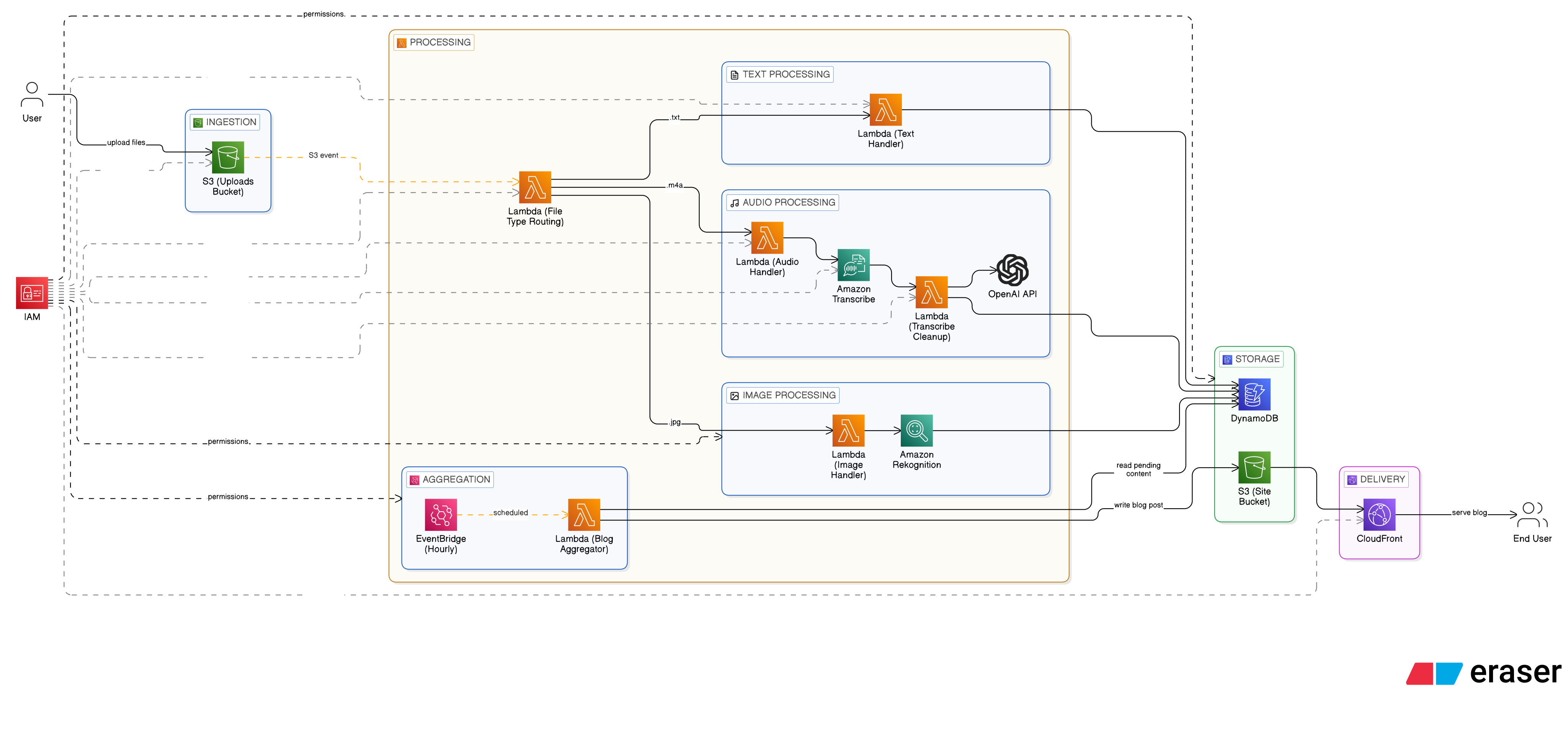
Click diagram to enlarge
☁️ Services & APIs
Amazon S3
Two buckets: one for raw uploads, one for processed website content. S3 event notifications trigger Lambda functions.
AWS Lambda
Five serverless functions: start transcription, validate transcription, process photos, build blog posts, and hourly batch creator for aggregating pending content.
OpenAI API
GPT models for validating and cleaning Amazon Transcribe output to improve transcription accuracy.
Amazon Transcribe
Converts voice recordings (.m4a files) into text transcriptions automatically.
Amazon Rekognition
Detects objects, scenes, and wildlife in photos, generating automatic tags and labels.
Amazon DynamoDB
NoSQL database storing metadata for each upload: timestamps, transcriptions, image labels, and processing status.
Amazon EventBridge
Scheduled events triggering hourly batch blog creation to aggregate pending content into unified posts.
Amazon CloudFront
Global CDN serving the static website with low latency from edge locations worldwide.
AWS SAM
Infrastructure as Code (IaC) for deploying Lambda functions, permissions, and event triggers.
AWS IAM
Fine-grained permissions for Lambda execution roles, S3 access, and service-to-service communication.
🔄 End-to-End Workflow
File Upload to S3
User uploads files to the source S3 bucket from mobile device or computer. Files are organized by timestamp and type (photos/, notes/, audio/).
S3 Event Triggers Lambda
S3 sends event notifications to Lambda functions based on file suffix:
- .m4a files → trigger
FnStartTranscribe - .jpg files → trigger
FnProcessPhotos - .txt files → trigger
FnBuildBlogPost
Audio Transcription
FnStartTranscribe starts an Amazon Transcribe job. When complete, FnValidateTranscription
is triggered to download the transcript, store it in DynamoDB, and mark the audio as processed.
Photo Processing
FnProcessPhotos uses Amazon Rekognition to detect objects, scenes, and landmarks. It generates
web-optimized thumbnails, stores labels in DynamoDB, and saves metadata for later blog assembly.
Blog Post Generation
FnBuildBlogPost queries DynamoDB for all entries matching the timestamp, assembles notes, transcriptions,
and photos into an HTML post, and uploads it to the site bucket.
Index Update
The blog post is added to site/blog/index.json, which contains metadata for all posts
(timestamps, S3 keys). This index is read by blog.html to display entries.
CloudFront Invalidation
Lambda creates a CloudFront invalidation for updated paths, ensuring users see fresh content immediately without cache delays.
User Views Journal
Users access blog.html via CloudFront. JavaScript fetches index.json, loads individual
post HTML files, and renders them as magazine-style cards with photos, transcriptions, and notes.